
Instagram Reels Safe Zone Template & Checker
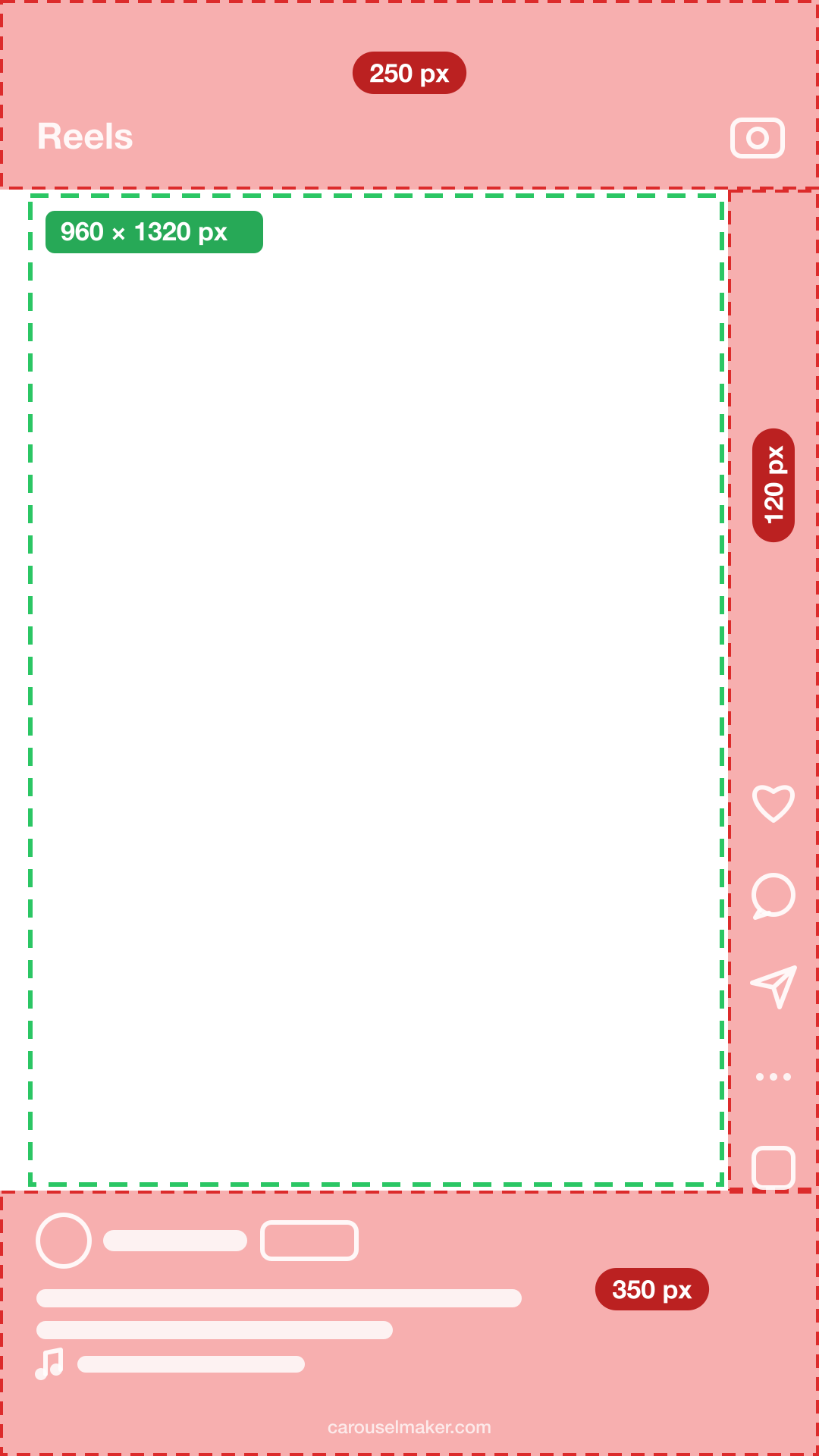
Keep text and faces out of the top 250 px, the bottom 350 px and the 120 px column of buttons on the right. Drop in a frame or cover to see what Instagram hides, or download the free 1080×1920 template.
Format
The Reels header and camera at the top; username, caption and audio at the bottom; like, comment and share down the right.
Drop a Reel frame or cover
JPG, PNG or WebP · up to 30MB · ideally 1080×1920
Overlay
Free Instagram Reels safe zone templates
Transparent 1080×1920 PNGs. Put one on the top layer in CapCut, Canva, Premiere Pro or Figma, design underneath, then hide it before you export.
Reels safe zone template
Top 250 px, bottom 350 px and the 120 px column of buttons on the right. Safe area about 960 × 1320 px.
Download PNG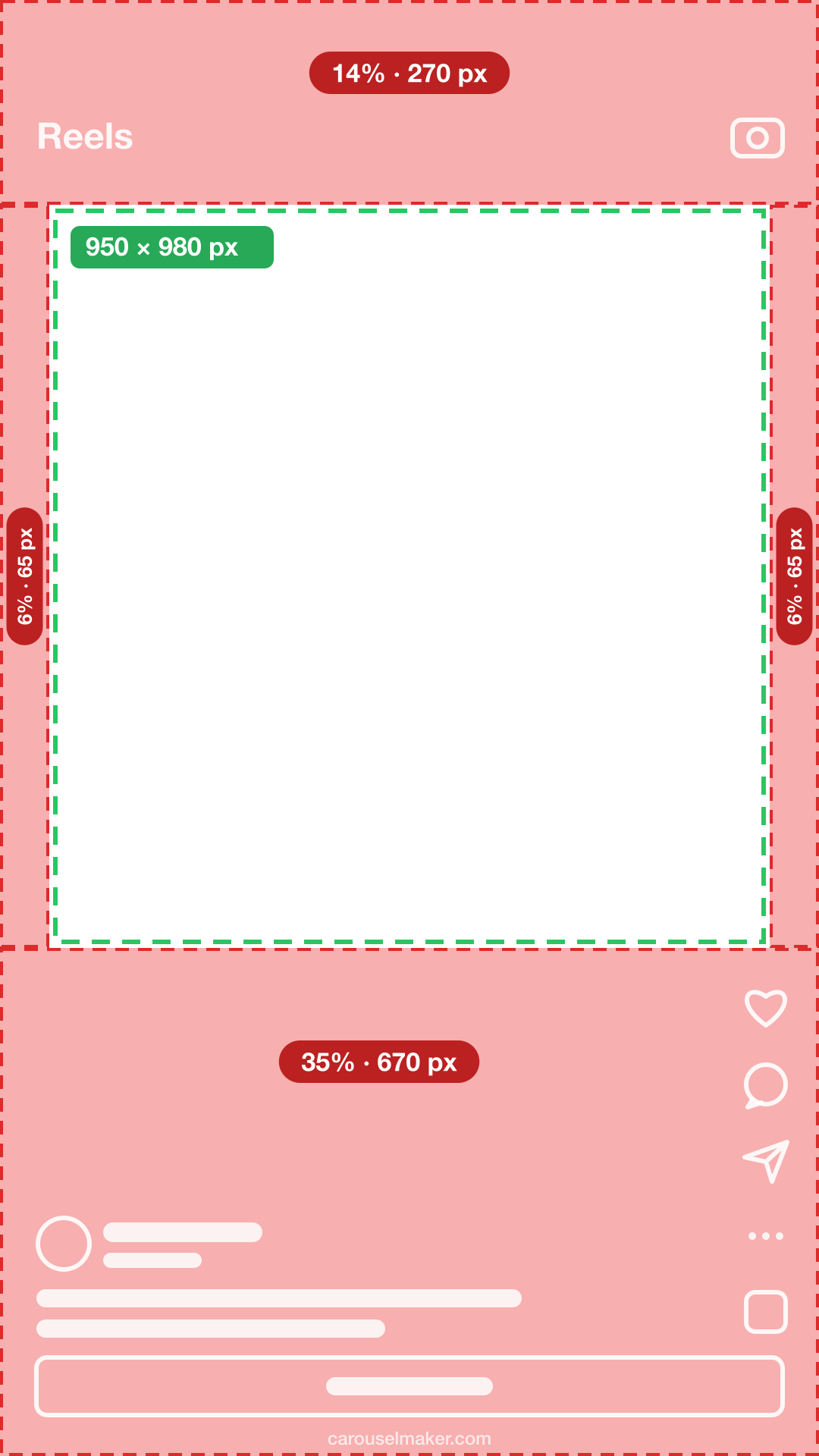
Reels ads safe zone template
14% at the top, 35% at the bottom and 6% on each side (270, 670 and 65 px). Safe area about 950 × 980 px.
Download PNGWhat Instagram covers on a Reel
Top 250 px
The Reels header and the camera button. Text up here sits behind them.
Bottom 350 px
Username, Follow button, caption and audio track. A caption grows when someone taps it, so keep your text well above this line.
Right 120 px
Like, comment, share and the audio thumbnail stack down the right edge. Keep text and faces to the left of them.
Safe area ≈ 960 × 1320 px
Put headlines, captions, faces and logos inside the green outline. Backgrounds and b-roll can run to the edges.
Instagram Reels safe zone size
A Reel is 1080 × 1920 px, a 9:16 frame. Instagram draws its own interface on top: the Reels header and camera at the top, the username, caption and audio track at the bottom, and a column of buttons on the right. Keep text, faces and logos out of those areas, inside the middle 960 × 1320 px.
| Reel size | 1080 × 1920 px |
| Aspect ratio | 9 : 16 |
| Top (Reels header, camera) | ~250 px |
| Bottom (username, caption, audio) | ~350 px |
| Right (like, comment, share) | ~120 px |
| Safe area | ~960 × 1320 px |
| Profile grid tile (cover) | Middle 1080 × 1440 px (3:4) |
| Reels ads, common guide | Top 14% · bottom 35% · sides 6% (~270 / 670 / 65 px) |
Why guides give different numbers
Meta doesn't publish pixel numbers for the Reels interface, so every guide measures it. You'll see 220–250 px for the top and 320–380 px for the bottom. The bands move a little with the phone, the caption length and new features. The numbers here sit at the cautious end: a design that fits them fits on most phones.
Safe zone for Reels ads
An ad adds a Sponsored label and a call-to-action button, so it needs more room at the bottom. Ad tools usually work to 14% at the top, 35% at the bottom and 6% on each side: about 270, 670 and 65 px on a 1080×1920 frame. Switch the checker to Reels ads to see it, and check the placement preview in Ads Manager before you launch.
Reel covers and the profile grid
Your profile grid shows each Reel as a 3:4 tile cut from the middle of its 9:16 cover, so about 240 px comes off the top and the bottom. Keep the cover's title inside the middle 1080 × 1440 px. Turn on Profile grid crop in the checker to see the cut.
How to use the template
- Download a template above, or the overlay from the checker with your own settings.
- Add it as the top layer in your editor (CapCut, Canva, Premiere Pro, Final Cut or Figma) and stretch it to the full 1080×1920 frame.
- Keep titles, captions, faces and logos inside the green outline.
- Hide or delete the template layer before you export.
- Drop a finished frame or your cover into the checker to double-check it.
Related
Posting a Story instead? The Instagram Story safe zone checker uses the Story bands, 155 px at the top and the bottom. Need sizes rather than safe zones? See the Instagram Story size guide and the Instagram carousel size guide.
Design the cover, not just the safe zone
Carousel Maker writes and designs posts with AI: professional templates, a drag-and-drop editor and 1080×1920 export for Reel covers and Stories.