
Make a LinkedIn carousel or slideshow from your existing content
Convert post drafts, rough notes, URLs, PDFs, or audio into crisp LinkedIn carousel posts — the PDF document posts LinkedIn turns into swipeable slides.


Loved by 1,200+ creators
Supported formats
Create the right asset for the way you want to show up on LinkedIn
LinkedIn Carousel Posts
Create swipeable LinkedIn posts to drive more engagement.
LinkedIn Carousel Ads
Turn your message into a slide-based creative for LinkedIn campaigns.
LinkedIn Banner Slideshows
Create rotating banner assets for LinkedIn profiles or company pages.
LinkedIn Document Posts
Export a LinkedIn-ready PDF designed for document-style posts and ads.
How it works
Turn your best ideas into LinkedIn slideshows in a few clicks
Add your content
Paste a LinkedIn post, notes, a rough outline, or a URL. Reuse the raw material you already have.
Choose a template
Choose a post structure and layout that best fits your message.
Edit the copy and style
Tighten the slide copy and choose a visual style that fits your brand.
Download and post
Export your LinkedIn slideshow as a ready-to-publish PDF or PNG file.
LinkedIn slideshow templates
Start with a layout that feels just right
Choose from proven formats like frameworks, checklists, teardowns, how-tos, and opinion-led POV decks.
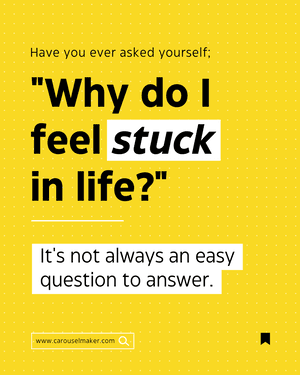
How-to guide
Break a useful process into clear, swipeable steps.
Use this template
Checklist
Turn your advice into a post people can save for later.
Use this template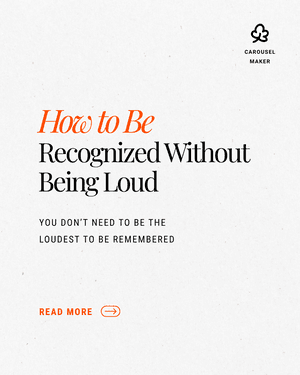
Founder lesson
Share a sharp point of view without writing a long caption.
Use this template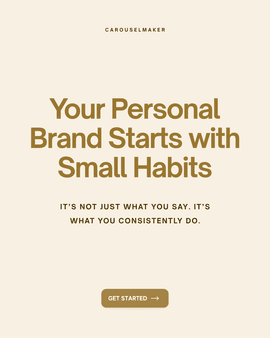
Framework
Break your ideas into a format people can understand and reuse.
Use this templateLinkedIn slideshow specs
What LinkedIn actually accepts as a slideshow
There is no “slideshow” button on LinkedIn. A LinkedIn slideshow — or carousel — is a PDF uploaded as a document post; LinkedIn renders each page as a swipeable slide. These are the limits the generator exports against.
| File type | PDF (PPT, PPTX, DOC, DOCX also accepted) |
| Recommended slide size | 1080 × 1350 px (4:5 portrait) |
| Also works | 1080 × 1080 px square · 1920 × 1080 px landscape |
| Max file size | 100 MB |
| Max pages | 300 (5–12 slides is the sweet spot) |
| Fonts | Embedded in the PDF — no font substitution |
| Links inside slides | Not clickable — put the CTA in the caption |
| Caption limit | 3,000 characters |
| Where it works | Personal profiles and company pages |
Why 1080 × 1350
Portrait slides take up the most vertical space in the LinkedIn feed, so the first slide is on screen longer before the reader scrolls past. Square works too and is easier to reuse on Instagram; landscape gets squeezed on mobile, where most of LinkedIn is read.
Every slide in the PDF must share one size — LinkedIn scales the whole document to the first page. The generator exports all slides at the same dimensions, so a mixed-size PDF never happens.
Full upload walkthrough, desktop and mobile: How to post a carousel on LinkedIn (PDF). Reusing the slides on Instagram? Check the Instagram carousel size first.
More free LinkedIn tools and guides
LinkedIn post formatter
Bold, italic, underline and lists for the caption that goes with your slideshow.
Instagram carousel maker
Repost the same slides at 1080×1350 for the Instagram feed.
Carousel engagement benchmarks
Why document posts out-perform images and text on LinkedIn in 2026.
LinkedIn carousel templates
Business-toned layouts for frameworks, checklists and reports.
Generator features
Making a gripping LinkedIn slideshow post has never been easier
Text to slides
Type your rough idea and get a LinkedIn slideshow draft in seconds.
URL, PDF, and audio imports
Turn source material into a swipeable slideshow that keeps the strongest ideas and adapts them for the feed.
Human-sounding LinkedIn content
Generate hooks, slide copy, captions, and CTAs that avoid generic AI filler and sound like a person with a point of view.
Slide-level editing
Rewrite, shorten, expand, reorder, or regenerate individual slides without rebuilding the whole carousel.
Brand kit controls
Save your colors, fonts, logo, headshot, and visual style so every carousel feels on point.
Multiple format variants
Turn one slideshow idea into organic LinkedIn carousel posts, document posts, or ad creative.
LinkedIn preflight check
Catch sizing, readability, slide count, CTA, and export issues before you publish.
Simple exports
Download slides as PDFs or PNGs for multi-image posts or reuse across other social platforms.
What people are saying

Lead iOS Developer | Swift | Mentor | Career advisor
I used to spend 2 hours per carousel in Canva. Now I describe what I want and it's done in 30 seconds. This is insane.
My content output went from 2 posts/week to daily. The ROI on this tool is ridiculous.


8,921 likes
evelina.marcus Built my first carousel in 2 minutes and it went semi-viral. I'm never going back to Canva 😭
February 14


The PDF export is chef's kiss. One click and it's ready for LinkedIn. No more exporting 10 separate images lol

Growth Manager at Rewardful
Went from 200 to 3,000 LinkedIn followers in 2 months.
The secret? I stopped overthinking and started posting daily carousels.
The AI writes better hooks than I do honestly. My engagement tripled.
If you're not using Carousel Maker yet, you're leaving growth on the table.

I manage social for 3 brands. Carousel Maker saves me roughly 8 hours a week 😭 The AI generation + templates combo is unbeatable ✨
3,654 likes
aras.creates Not exaggerating. If you're managing multiple brands, this is non-negotiable 💅
January 5
POV: you find a tool that makes carousels in 30 seconds and your content game changes forever 🤯


Agency Owner | Helping brands scale content
I run a marketing agency and we switched all our clients to Carousel Maker.
The templates actually look professional, not like every other generic tool out there.
Our team's content output increased 4x. Highly recommend.


12,408 likes
kristupas.co Posted my first carousel and got 40K impressions 🤯 I was shocked. The AI really knows how to structure content for engagement
December 19


This tool is going VIRAL for a reason. I create content in English and Spanish from the same prompt. Game changer fr 🌍
Create your first LinkedIn slideshow for free
Support
FAQs
How do you make a slideshow on LinkedIn?
How many slides should a LinkedIn slideshow have?
Can I upload a PDF slideshow to LinkedIn?
Can I turn an existing LinkedIn post into a slideshow?
Do I need Canva to create a LinkedIn slideshow?
Your next LinkedIn slideshow is hiding in a rough draft
Paste the idea. Choose a layout. Download a post you can publish today.
Need some inspo? Browse templates