
Make an Instagram carousel from a single idea
Type the topic or paste a caption. Get a swipeable 1080×1350 carousel with a hook slide, body slides and a CTA — then fine-tune it in the editor and download the slides.


Loved by 1,200+ creators
What you can make
Every kind of Instagram carousel, sized correctly
Feed carousel
1080×1350 portrait — the format that takes up the most feed space, and the size of the Instagram templates.
Square carousel
1080×1080 when you want zero crop surprises on the profile grid, or you reuse slides on other platforms.
Seamless carousel
One wide design sliced across slides so a background or arrow continues as people swipe.
Story teaser
Switch the canvas to 1080×1920 and export a Story version to point followers at the post.
How it works
From idea to posted carousel in four steps
Add your idea
Describe the topic, paste a caption or notes, or drop in a URL to repurpose.
Pick a template
Choose a swipe-friendly layout. Slide 1 hook, body slides and CTA are already structured.
Edit slides and brand
Tighten the copy, swap colours and fonts, add your handle. One click applies your brand to every slide.
Download and post
Export every slide as a JPG at exactly 1080×1350 (or animated slides as MP4). Upload to Instagram in order — done.
Instagram carousel templates
Start from a layout, not a blank canvas
Designed the way top Instagram carousels are made: a cover that stops the scroll, one idea per slide, and an ending worth saving. Pick one and AI fills it for your topic, or replace the words yourself.

Travel carousel
Full-bleed photos, soft serif type and a handwritten note per place.
Use this template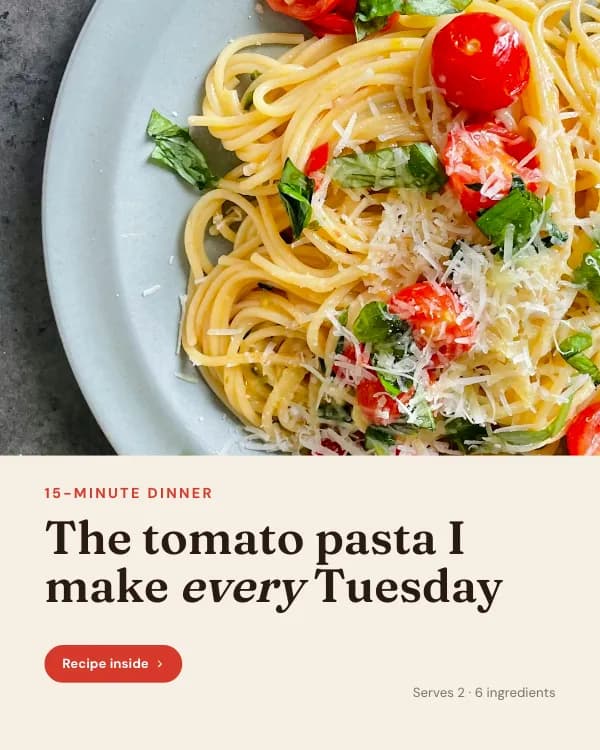
Recipe carousel
The dish on the cover, an ingredient checklist and photo steps.
Use this template
Myth vs fact
Each myth crossed out, the fact under it: built to be saved.
Use this template
Video carousel
Looping clips on the cover and between the photo slides.
Use this templateInstagram carousel specs
What Instagram accepts as a carousel
These are the limits the generator exports against. Every slide has to share one aspect ratio — Instagram locks the whole post to slide 1.
| Slide size | 1080 × 1350 px (4:5) recommended |
| Also accepted | 1080 × 1080 (1:1) · 1080 × 566 (1.91:1) |
| Max slides | 20 per post |
| File types | JPG, PNG (up to 30 MB each) |
| Profile-grid crop | Center 1012 × 1350 stays visible |
| Caption limit | 2,200 characters |
| Hashtags | Up to 30 — 3 to 5 is plenty |
| Export | JPG per slide (ZIP), MP4 or GIF for animated slides |
Why 1080 × 1350
Portrait 4:5 fills about 20% more of the screen than square, so slide 1 is on screen longer before the reader scrolls past. The trade-off is the profile grid, which trims ~34 px off each side — the editor keeps text inside that zone.
Mixed ratios are not allowed: Instagram locks every slide to the ratio of the first one. The generator exports all slides at the same size, so a rejected upload never happens.
Instagram carousel size tool · How to make an Instagram carousel
Generator features
Everything the swipe needs, nothing it doesn’t
Text to slides
Type a topic or paste a caption and get a full Instagram carousel draft in seconds.
URL, PDF and audio imports
Turn a blog post, a PDF or a voice note into a carousel that keeps the strongest points.
Hooks that sound like you
Slide-1 hooks, body copy and CTAs written without the generic AI filler.
Slide-level editing
Rewrite, shorten, reorder or regenerate one slide without touching the rest.
Brand kit
Save colours, fonts, logo and handle so every carousel matches your grid.
Grid-aware templates
Layouts keep headlines away from the ~34 px each side that the profile grid trims.
Preflight check
Catches sizing, readability, slide-count and CTA issues before you export.
JPG, MP4 and GIF export
Every slide at exact size, all at once as a ZIP; animated slides as video.
More free Instagram tools and guides
Instagram carousel size
All three ratios, the grid crop, and a free resizer for up to 20 slides.
Instagram carousel templates
Curated 1080×1350 layouts you can edit in the browser.
How to make an Instagram carousel
Planning, design and posting — the full walkthrough.
Instagram Story size
Turn a slide into a 1080×1920 Story teaser for the post.
What people are saying

Lead iOS Developer | Swift | Mentor | Career advisor
I used to spend 2 hours per carousel in Canva. Now I describe what I want and it's done in 30 seconds. This is insane.
My content output went from 2 posts/week to daily. The ROI on this tool is ridiculous.


8,921 likes
evelina.marcus Built my first carousel in 2 minutes and it went semi-viral. I'm never going back to Canva 😭
February 14


The PDF export is chef's kiss. One click and it's ready for LinkedIn. No more exporting 10 separate images lol

Growth Manager at Rewardful
Went from 200 to 3,000 LinkedIn followers in 2 months.
The secret? I stopped overthinking and started posting daily carousels.
The AI writes better hooks than I do honestly. My engagement tripled.
If you're not using Carousel Maker yet, you're leaving growth on the table.

I manage social for 3 brands. Carousel Maker saves me roughly 8 hours a week 😭 The AI generation + templates combo is unbeatable ✨
3,654 likes
aras.creates Not exaggerating. If you're managing multiple brands, this is non-negotiable 💅
January 5
POV: you find a tool that makes carousels in 30 seconds and your content game changes forever 🤯


Agency Owner | Helping brands scale content
I run a marketing agency and we switched all our clients to Carousel Maker.
The templates actually look professional, not like every other generic tool out there.
Our team's content output increased 4x. Highly recommend.


12,408 likes
kristupas.co Posted my first carousel and got 40K impressions 🤯 I was shocked. The AI really knows how to structure content for engagement
December 19


This tool is going VIRAL for a reason. I create content in English and Spanish from the same prompt. Game changer fr 🌍
Create your first Instagram carousel for free
Support
Instagram carousel maker FAQ
Is the Instagram carousel maker free?
What size does it export Instagram carousels in?
How do I post the carousel on Instagram?
Can it write the carousel for me?
How many slides should an Instagram carousel have?
Can I mix photos and designed slides?
Do I need Canva or Photoshop?
Your next Instagram carousel is already in your notes
Paste the idea. Pick a layout. Download slides you can post today.
Need some inspo? Browse Instagram templates