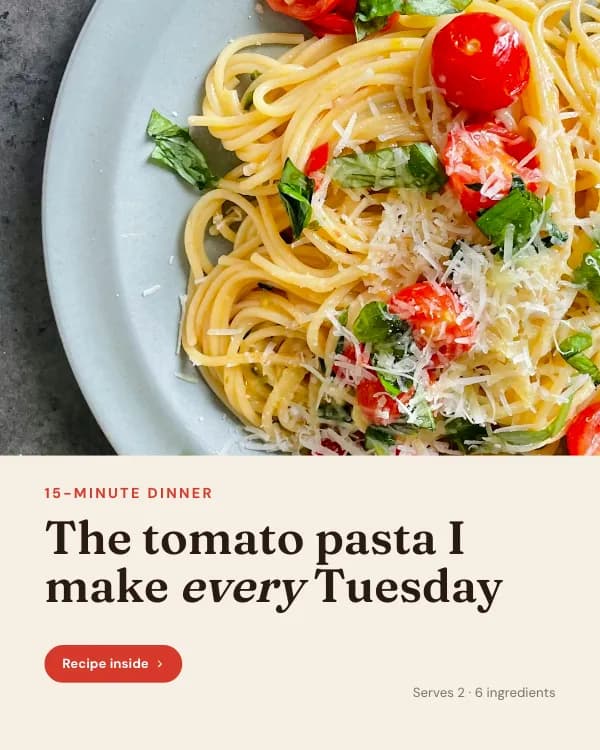
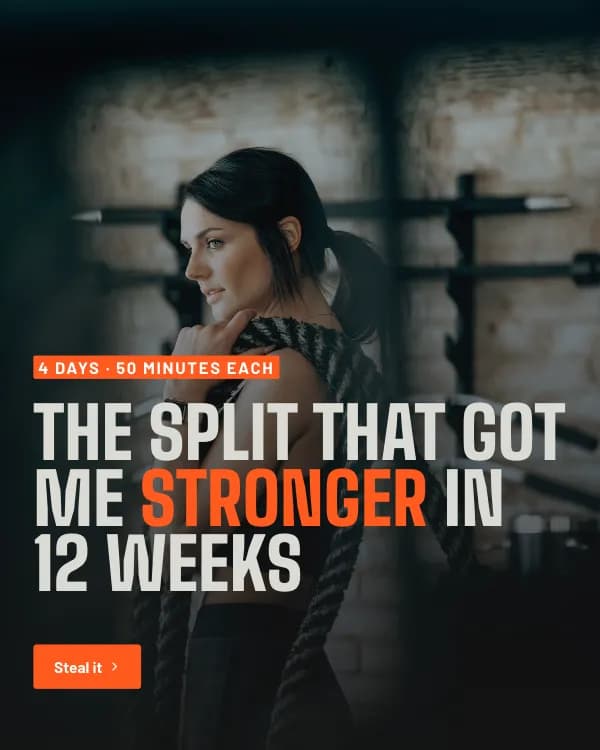
An Instagram carousel is a single post with up to 20 photos or videos that people swipe through. It is the format that gets a second look: a carousel can appear in the feed twice (once on the first slide, again on the second if you did not swipe), and each swipe counts as a signal that the post is worth showing to more people. This guide walks through making one from scratch in 2026 — the specs, the planning that makes people swipe, the design and export, and the exact steps to post it on a phone or a desktop.
What counts as an Instagram carousel
Any feed post with more than one image or video is a carousel. Instagram shows the first slide in the feed with a small stack icon and “1/7”-style counter; followers swipe to see the rest, and dots under the post show progress. Carousels live in the main feed and on your profile grid — they are not Stories (which disappear) or Reels (which are video-first and 9:16).
The catch that trips most people up: every slide must share one aspect ratio. Instagram takes the ratio from the first slide you add and crops everything else to match. Decide the format before you design, not after.
Instagram carousel specs (2026)
| Recommended size | 1080 × 1350 px (4:5 portrait) |
| Also accepted | 1080 × 1080 (1:1) · 1080 × 566 (1.91:1) |
| Slides per post | 2 – 20 |
| File types | JPG, PNG, HEIC (images) · MP4, MOV (video) |
| Video per slide | Up to 60 seconds |
| Profile-grid crop (4:5) | Center 1012 × 1350 visible |
| Caption | 2,200 characters, up to 30 hashtags |
| Aspect ratio rule | Locked to slide 1 for the whole post |
Portrait 4:5 is the default choice: it takes about 20% more screen than square, so slide one stays in view longer before the reader scrolls on. The trade-off is the profile grid, which trims the sides — the Instagram carousel size tool shows exactly what survives the crop.
Step 1 — Plan the swipe before you design anything
A carousel is a tiny presentation with a brutal drop-off curve: most people who see slide one never reach slide five. So the plan is not “what do I want to say” but “what earns the next swipe”. A structure that works for almost every topic:
- Slide 1 — the hook. One line, big type, a claim or a question people want resolved. Not a title card, not your logo.
- Slide 2 — the promise. What they will have by the last slide, in one sentence. This is the slide that turns a glance into a swipe.
- Slides 3 to N-1 — one idea per slide. A heading and one or two lines of support. If a slide needs a paragraph, it is two slides.
- Last slide — the call to action. Save, share, follow or comment — pick one. Recap the promise so the save feels earned.
Write the copy for every slide in a document first. Cutting words is far easier in text than on a designed slide, and it forces the question of whether a slide deserves to exist. Seven to ten slides is the sweet spot for educational posts; three to five for a single announcement or quote.
Step 2 — Design the slides
Set the canvas to 1080×1350 before placing anything. From there, the choices that matter:
- Consistency over variety. Same background, same type sizes, same accent colour on every slide — the swipe should feel like turning pages of one thing.
- Type large enough to read at arm’s length on a phone: roughly 60 px or larger for body text on a 1080-wide canvas, 90–120 px for slide-one headlines.
- A 60–80 px margin on every side. It clears the profile-grid crop and the “1/7” counter in the top-right corner.
- A swipe cue on slides 1 to N-1 — an arrow, “swipe →” or a page number in the bottom-right corner.
- Optional: a seamless (panorama) background. Design once at 3240×1350 for three slides, slice into 1080-px pieces, and the image continues across the swipe.
Starting from a template is faster than starting blank, because the hook, body and CTA slides are already structured. The Instagram carousel templates are all pre-sized to 1080×1350; the Instagram carousel maker goes a step further and drafts the slide copy from a topic or a pasted caption.
Step 3 — Export at exact size
Export every slide as a separate PNG (or high-quality JPG) at 1080×1350. Number the files (01, 02, 03…) so they sort in order when you select them on the phone. Two checks before you upload: make sure no slide is a different ratio — one odd file and Instagram crops the whole post — and drop the set into the carousel size tool to swipe through a phone-mockup preview and confirm nothing important sits in the grid crop.
How to post a carousel on Instagram
On the app:
- Tap + and choose Post.
- Tap the multi-select icon (the stacked squares) above your camera roll.
- Tap the slides in order — the number badge shows the sequence. Instagram takes the aspect ratio from the first one.
- Tap Next. You can apply one filter to all slides or edit them individually; for designed slides, skip edits.
- Tap Next again, write the caption (hook first — only the first line or two show before “more”), add alt text under Advanced settings, then tap Share.
On desktop, go to instagram.com, click Create, select all the slide files at once (or add more with the + in the preview), drag to reorder, click Next, add the caption and share. Both routes give the same result — the desktop one is handy when the slides were exported on the same machine.
Five mistakes that quietly kill carousels
- A title-card first slide. “5 tips for better sleep” in small text over a stock photo does not stop a scroll; “You are losing 2 hours of sleep to one habit” does.
- Mixed ratios. One square slide in a portrait set means the whole carousel gets cropped to square.
- Text in the crop zones — the outer ~34 px each side (profile grid) and the top-right corner (slide counter).
- Too many slides for the idea. If slides 6 to 12 are padding, most readers will never see the CTA on slide 12 anyway.
- A thank-you slide instead of a CTA. The last slide is the one place a save or a follow is natural — ask for it.
Posting the same slides on LinkedIn too? The process is different there — LinkedIn carousels are PDF document posts — and we cover it step by step in how to post a carousel on LinkedIn.
Make the carousel in the time it took to read this
Describe the topic or paste a caption, get hook, body and CTA slides drafted at 1080×1350, adjust in the editor, download the PNGs. Free to start.
Frequently asked questions
What size should an Instagram carousel be?+
How many slides can an Instagram carousel have?+
Can I make an Instagram carousel on desktop?+
Can I mix photos and videos in one carousel?+
Why does my carousel look cropped on my profile?+
Can I edit a carousel after posting?+
Sources
- Instagram Help Center — Share multiple photos and videos in one post (help.instagram.com)
- Instagram — Carousel posts expanded to 20 photos and videos (2024) (about.instagram.com)